November 14, 2006

GeoTrax Track Layout Ideas - Part II

Another great source for GeoTrax track layout ideas comes from an eBay user (e-store-24) who has created some well-designed track layout manuals.

Only on eBay - One-of-a-kind GeoTrax Track Layout Manuals
     o Vol. 3 - Elevation Track Layouts
     o Vol. 4 - Table Top Layouts
     o Vol. 5 - Workin' Town Layouts

The track layout manuals can be purchased on eBay for $9.99 + $2.50 shipping. These track layouts have been designed using professional CAD graphical software. Look at the detail...
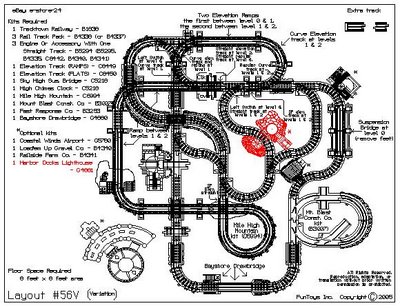
Click to see the auctions
Image Credit: e-store-24

It appears a total of 5 track layout manuals have been created to date. Vols. 3, 4 and 5 are actively being sold on eBay.

Here is a little bit more about these manuals...

Volume 3 focuses on the elevation series of GeoTrax sets and includes 16 different track layouts. The layouts have been well thought out so that the trains can run in both directions and won't get stuck in a loop. Track layouts are also large enough to get 3, 4 and even 5 trains running at the same time.

Volume 4 accomplishes the goal of creating space-efficient layouts designed for table top (or floor) assembly. Parents can appreciate track layouts that don't occupy floor space throughout the entire house. Learn to assemble feature rich layouts in compact spaces--manual includes 16 new layouts.

Volume 5 is geared towards building layouts with the Workin' Town Railway set plus a minimal amount of additional sets.

All layout manuals include a table that shows a list of all layouts and the sets required when assembling the layout. Here is an example from Vol. 5.
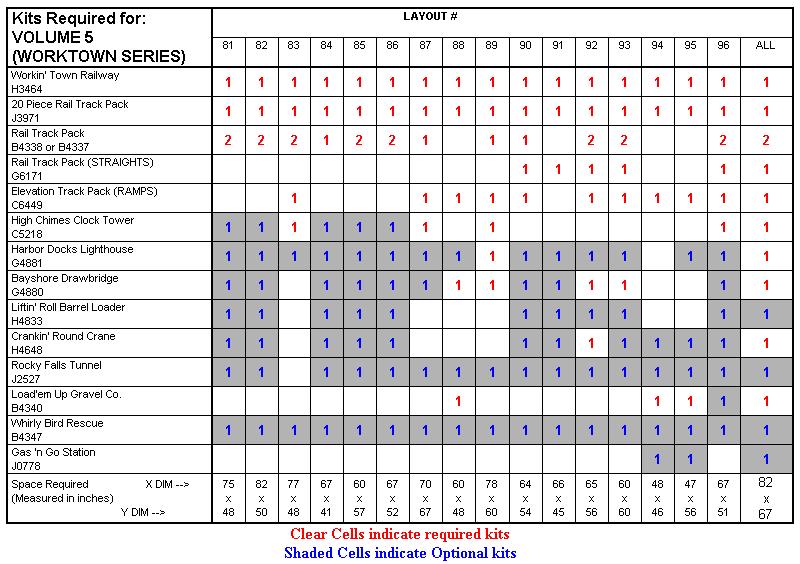
Table of sets required
Image Credit: e-store-24

Only on eBay - One-of-a-kind GeoTrax Track Layout Manuals
     o Vol. 3 - Elevation Track Layouts
     o Vol. 4 - Table Top Layouts
     o Vol. 5 - Workin' Town Layouts

Search eBay: geotrax layout manual

November 4, 2006

GeoTrax New Releases - Lift 'N Load Quarry, Bulldozer & Dump Truck

Free shipping eligible for purchases over $25 on amazon.com -- Buy The Lift 'N Load Quarry Now!

More new releases from Fisher-Price just in time for Christmas. All three are great additions to your construction set.

First is the Lift 'N Load Quarry. It looks like a really cool set including a conveyor belt and a spiral shoot for the rocks to roll down before being loaded onto a train or truck. It also comes with the new T-track piece. Here is a picture from the Instruction Sheet.

Lift 'N Load QuarryImage Credit: Fisher Price: GeoTrax Lift 'N Load Quarry Instruction Sheet.

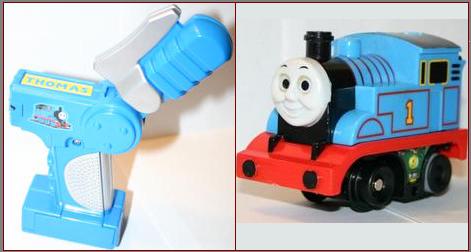
Two new remotes are being released a Bulldozer and a Dump Truck. Even more exciting is the fact that they now come with a reverse direction option. That's right, using your remote you can make them go forward AND backwards. Check out the new remote style.

GeoTrax remotes with reverse optionImage Credit: Fisher Price: GeoTrax Instruction Sheets.

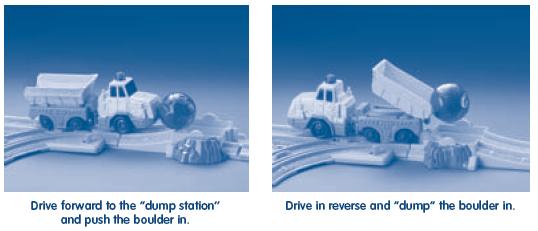
These look like fun, the dump truck even has real dumping action. Here are some pictures from the Instruction sheets.

GeoTrax BulldozerImage Credit: Fisher Price: GeoTrax Bulldozer Instruction Sheet.

GeoTrax Dump TrackImage Credit: Fisher Price: GeoTrax Dump Truck Instruction Sheet.

Both of these remotes interact well with the new Quarry...

October 30, 2006

GeoTrax Track Layout Ideas - Part I

Designing a track layout is part art and part science. I remember when we bought our first GeoTrax set, the Tracktown Railway, my wife kept saying, "Don't throw the box away, we need it as a reference to put the track together."

Once you add a few sets to your collection, you quickly out grow the basic layouts and are left to your own creativity. Once I found a few resources on the web, I was able to convince my wife to release her security blanket (the box), and let her creativity flow.

I am happy to report she has become quite the designer or her own original and creative railroad track layouts. The next few posts will focus on some resources available to help any of you who are stumped to get going on creative track layouts.

First a little inspiration...queue the Zydeco music...

(Press the play button (2 times) in the center of the image to play the movie.)

Credit: YouTube user EricTimothyJessen Special Thanks to Matthew, Eric, Chad & Blake for creating this!

Fisher-Price recognized the need and added some track layouts to their site. These can be hard to find in Google because of all the flash animation that FP uses on its website. No worries, I have creative a comprehensive list of the links for you here, enjoy!

Beginner Track Layout #1
(Printer Versions: Basic (Overhead) View, Enhanced View)

Beginner Track Layout #2
(Printer Versions: Basic (Overhead) View, Enhanced View)

Intermediate Track Layout #1
(Printer Versions: Basic (Overhead) View, Enhanced View)

Intermediate Track Layout #2
(Printer Versions: Basic (Overhead) View, Enhanced View)

Advanced Track Layout #1
(Printer Versions: Basic (Overhead) View, Enhanced View)

Advanced Track Layout #2
(Printer Versions: Basic (Overhead) View, Enhanced View)

Expert Track Layout #1
(Printer Versions: Basic (Overhead) View, Enhanced View, Step-by-step Instruction Sheet (PDF))

Expert Track Layout #2
(Printer Versions: Basic (Overhead) View, Enhanced View, Step-by-step Instruction Sheet (PDF))

Or, for those who yearn for simpler times, here are the Tracktown Railway Track Layouts I mentioned earlier in this post.

October 24, 2006

A Complete, Online GeoTrax Checklist

I found this site recently that has a couple great resources you should now about. The first is a Complete GeoTrax Checklist. The list is color-coded indicating what collection the set is a part of, pictures, part numbers, descriptions and MSRP.

If you want you can get a printable copy of the GeoTrax checklist in PDF format (item picture and name only). The list is up to date including the recent Big City sets.

From the checklist page you can also link to a list of all the GeoTrax Instruction Manuals. The site is well done, it also comes with a discussion forum and some news about GeoTrax.

I do have one request...I wish the owner of the site would open the discussion forum for browsing without signing in. Search engines would have access to a lot more content that could be indexed which would only increase traffic to the site making for a larger community of contributors. Anyway, have a look and see what you think.

October 11, 2006

Craigslist - Another great place to buy GeoTrax

Do you want to get a good deal on GeoTrax...have you tried http://www.craigslist.org. If you are unfamiliar with it, it might not look like much at first but this is a great and free classified ads system.

Choose the State and then City in which you live, then off you go. Try a number of different search terms individually as many people are less careful about the keywords they use in their ads.

I suggest trying things like geotrax, geo trax, geo tracks, fisher price train and any others you can think of.

They also give you an RSS feed that you can plug into your favorite RSS reader so you will notice right away when new items are posted.

September 12, 2006

GeoTrax + Thomas = Thomax (or is that GeoMas?)


mrbunky13 you are genius!!! I am sure many parents out there struggle with the same issue of having kids that want to play trains with Thomas and GeoTrax together in the same set and you found a way to make that happen.

Check out mrbunky13's Thomax train gallery on the GeoTrax Yahoo! Group to see pictures and instructions of how to convert a GeoTrax Train Engine and Remote Controller into a Thomas version.

Note: You must join the GeoTrax Yahoo! group in order to view the picture gallery of this adapted train.

August 3, 2006

GeoTrax Track Designer Online - Flash Required

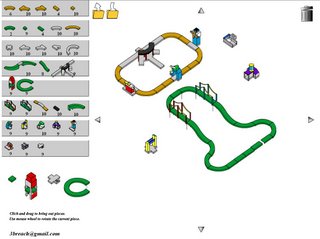
I saw this mentioned in the Yahoo! Geotrax Group. An Online GeoTrax Track Designer, how cool is that?

Track Layout Designer

NOTE: I have to set expectations correctly...as of the time of this writing none of the new sets (Big City Stuff) are yet included. But, this is definitely worth a look.

You can drag track and add other pieces onto your design, use the mouse to rotate your parts and snap them all together. And if you run out of room....simply click on your design and drag the entire track layout to a different part of the screen. (There is something you can't do in real life in your own living room...moving a track layout over even the smallest amount to avoid an obstacle can be a royal pain).